
Customers today expect fast answers, on their terms. They want to find information themselves, get help without waiting, and move on with their day. When that experience breaks down, whether because a team is stretched thin, a question goes unanswered, or a simple task requires human intervention, it costs you the relationship.
The businesses feeling this most are those where growth has outpaced their support capacity. Teams are buried in repetitive questions, customers are stuck waiting, and no one has the breathing room to focus on work that actually moves the needle.
AI customer agents address all of it at once: faster responses, better self-service options, more consistent experiences, and a support operation that scales without adding headcount.
What Is an AI Customer Agent?
An AI customer agent is software that uses artificial intelligence to handle customer interactions automatically across channels such as web chat, email, and messaging apps. Unlike a basic chatbot that follows a fixed script, an AI customer agent understands context, draws from a knowledge base, and can take action by answering questions, routing tickets, booking meetings, and escalating to a human when needed. It operates 24/7 without a queue, and every interaction is logged directly to your CRM.
What an AI Customer Agent Actually Does
An AI customer agent isn’t a smarter FAQ page or a more sophisticated chatbot. It’s a front-line team member that operates across every channel, including web chat, email, and WhatsApp, around the clock. It surfaces customer context instantly, drafts personalized responses, handles repetitive inquiries autonomously, and knows when to hand off to a human rep.
The distinction matters: this technology works alongside your existing tools and team, not instead of them. Think of it as the difference between hiring an assistant to handle your scheduling versus replacing your entire operations team. The former amplifies what you already have. The latter creates a different set of problems.
The right way to think about AI customer agents is as a force multiplier, one that makes your existing workflows significantly more effective without requiring you to build new systems from scratch.
| Traditional Chatbot | AI Customer Agent | |
|---|---|---|
| How it works | Follows a fixed script or decision tree | Understands natural language and context |
| Knowledge | Your hospitality gallery had 200 visits | Draws from a live knowledge base |
| CRM integration | Rarely | Native, logs every interaction |
| Handles new questions | No | Yes |
| Available 24/7 | Yes | Yes |
| Escalates to humans | Basic routing only | Intelligent handoff with full context |
| Learns over time | No | Yes |
| Best for | Simple, scripted FAQs | High-volume, varied customer inquiries |
The Business Case in Hard Numbers
For companies that have moved past curiosity and into deployment, the results are consistent and measurable.
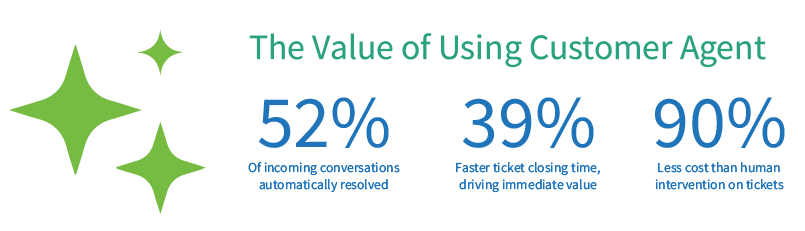
Data from companies using AI customer agents alongside HubSpot’s Help Desk shows that 52% of incoming conversations are automatically resolved. This means more than half of inquiries never need to touch a human agent. Ticket closing times improve by 39%, and the cost per resolution is up to 90% lower than human intervention.
Those aren’t marginal gains. For a team handling 500 tickets a week, that’s 260 conversations handled before a rep even opens their inbox. It’s a meaningful shift in how support scales.
The bottom line is that the AI handles the high-volume, repetitive work; humans handle the high-stakes, nuanced work. Both sides of the equation get better.
Three Places It Creates the Most Value
1. Customer Support at Scale
This is the most obvious use case, and often the most urgent. Support teams are under pressure from every direction: customer expectations are higher, ticket volume keeps climbing, and headcount budgets are flat. The math doesn’t work without a different approach.
An AI customer agent handles billing questions, password resets, how-to inquiries, and status updates instantly, across time zones, around the clock, without a queue. It draws from your knowledge base and product documentation to give accurate, consistent answers. When a question exceeds its scope, it routes to the right person with full context already captured.
The impact on team morale is worth noting, too. When employees aren’t drowning in repetitive tasks, they show up differently for the complex cases that actually require empathy, judgment, and expertise.
2. Marketing — Turning Traffic Into Pipeline
Many websites have the same problem: they attract traffic but convert it poorly. A visitor lands on a high-intent page, like pricing, product comparison, or case studies, has a specific question, can’t find an immediate answer, and leaves. Traditional forms make them wait hours for a follow-up they may never read.
An AI customer agent acts as a front-of-site concierge. It engages visitors in real time, answers product questions, qualifies intent, and books meetings, all without a human in the loop. Every interaction feeds directly back into your CRM, creating cleaner segmentation and smarter retargeting.
The difference between a form and a real-time conversation isn’t just speed; it’s the quality of the first impression. Buyers who get immediate, relevant answers are fundamentally different from buyers who fill out a form and wait.
3. Sales — Keeping Deals Moving After Hours
Deals stall. A prospect gets excited in a discovery call, has a follow-up question that evening, doesn’t get a response until the next morning, and by then the urgency has faded. Or they’re ready to evaluate pricing, but your rep is in back-to-back meetings. The window closes.
An AI customer agent removes that friction. It answers pricing and product questions when reps are offline, qualifies inbound interest from any channel, and books meetings the moment a prospect is ready. The buying committee, often multiple stakeholders asking different questions at different times, gets immediate value throughout the process, not just during formal touchpoints.
For sales teams, the mental model shift is simple: you’re not replacing rep conversations, you’re ensuring no conversation is lost because no one was available

Who Gets the Most from This Technology
Like any tool, AI customer agents deliver the most value in specific contexts. The ideal fit tends to look like this: a team handling high volumes of repetitive inquiries, operating with growth pressure that makes adding headcount impractical, and already invested in CRM infrastructure.
Conversely, businesses with very low ticket volume or highly bespoke, complex cases that require deep human judgment may find the ROI harder to realize in the short term, not because the technology doesn’t work, but because the volume needed to justify it isn’t there.
The practical screening question is: “How many tickets per week does your team handle, and what percentage of those are answering the same core questions?” If the answer is hundreds of tickets and a significant majority are repetitive, the math makes sense. If it’s dozens of highly customized cases, the priority should be elsewhere.
The Organizational Readiness Question
Most AI customer agent deployments that underperform share a common cause: the underlying data isn’t ready. An AI is only as useful as the knowledge base it draws from. If your documentation is incomplete, outdated, or scattered across tools, the agent will surface that inconsistency quickly.
The good news is that preparing for deployment often forces the kind of knowledge base cleanup and content organization that teams have been meaning to do for years. Treated as a pre-launch prerequisite, it pays dividends regardless of what the AI does next.
The teams that see the fastest time-to-value are those that start with a narrow, well-defined scope: one department, one channel, one category of inquiry; rather than trying to automate everything at once. They measure resolution rates and customer satisfaction in the first 30 days, iterate on the knowledge base, and expand from there.
Frequently Asked Questions About AI Customer Agents
What types of businesses benefit most from an AI customer agent? Businesses with high volumes of repetitive support questions and limited capacity to scale headcount see the fastest ROI. This includes SaaS companies, e-commerce brands, and B2B service providers handling consistent inbound inquiry volume.
How is an AI customer agent different from a chatbot? A traditional chatbot follows a fixed decision tree; it can only respond to questions it was explicitly programmed for. An AI customer agent understands natural language, learns from your knowledge base, and can handle questions it hasn’t seen before. It also integrates with your CRM to surface customer history and context in real time.
How long does it take to set up an AI customer agent? Most deployments take two to six weeks, depending on the quality of your existing knowledge base. The more organized your documentation, the faster the setup. Starting with a single channel and a narrow use case significantly shortens time to value.
What happens when the AI can’t answer a question? A well-configured AI customer agent recognizes when a question is outside its scope and routes it to the right human agent, with the full conversation context already captured, so the handoff is seamless.
How much does an AI customer agent cost? Pricing varies by platform and usage volume. Most solutions are priced per resolution or per conversation. HubSpot’s Customer Agent, for example, is priced at approximately $0.50 per resolution, significantly lower than the cost of human-handled tickets.
Will an AI customer agent replace my support team? No. AI customer agents handle repetitive, high-volume inquiries so your team can focus on complex, high-value interactions. The best implementations use AI to increase what each human agent can handle, not to reduce headcount.
From Tool to Competitive Advantage
There’s a useful way to think about where AI customer agents sit relative to your business model. Right now, most of your competitors are either not using them, just getting started, or using them poorly. The gap between “we deployed something” and “we’re getting measurable value” is where the real opportunity lives.
The businesses seeing the most meaningful results aren’t the ones that moved fastest; they’re the most intentional ones. They identified the right use case, prepared their data, set clear success metrics, and treated the first 90 days as a learning phase rather than a finished product.
Speed-to-response used to be a differentiator. Increasingly, it’s a baseline expectation. Customers don’t remember the experience of waiting for an answer; they remember the frustration. An AI customer agent doesn’t just save your team time. It changes the experience your customers have with your brand at every hour of the day.
That’s the actual business case.
Related Reading
- Is Your HubSpot Investment Falling Short? — What to do when HubSpot isn’t delivering the results you expected.
- HubSpot INBOUND 2025: Welcome to the AI-First Marketing Era — What the shift to AI-first operations means for your marketing and sales teams.
- Why Your Website Redesign Failed — How to build a site that actually generates pipeline, not just traffic.